Built around the direct order flow.
A customer orders from your link, pays your business QR directly, uploads proof, and comes back through your customer record.

The Photo Magic
A quick photo gives you a draft shop to review. Kedaiflow helps extract your business name, story, products, and prices — then you decide what goes live.
1-photo onboarding
AI drafts your shop name, story, menu, and prices in seconds. You review before sharing; your photo stays exactly as you shot it.
Editable draft first
Kedaiflow gives you a clean starting point. You edit the name, story, products, and prices before anything goes live.
One-tap share
Once your shop is live, share to your IG bio, WhatsApp status, or anywhere with a single tap.
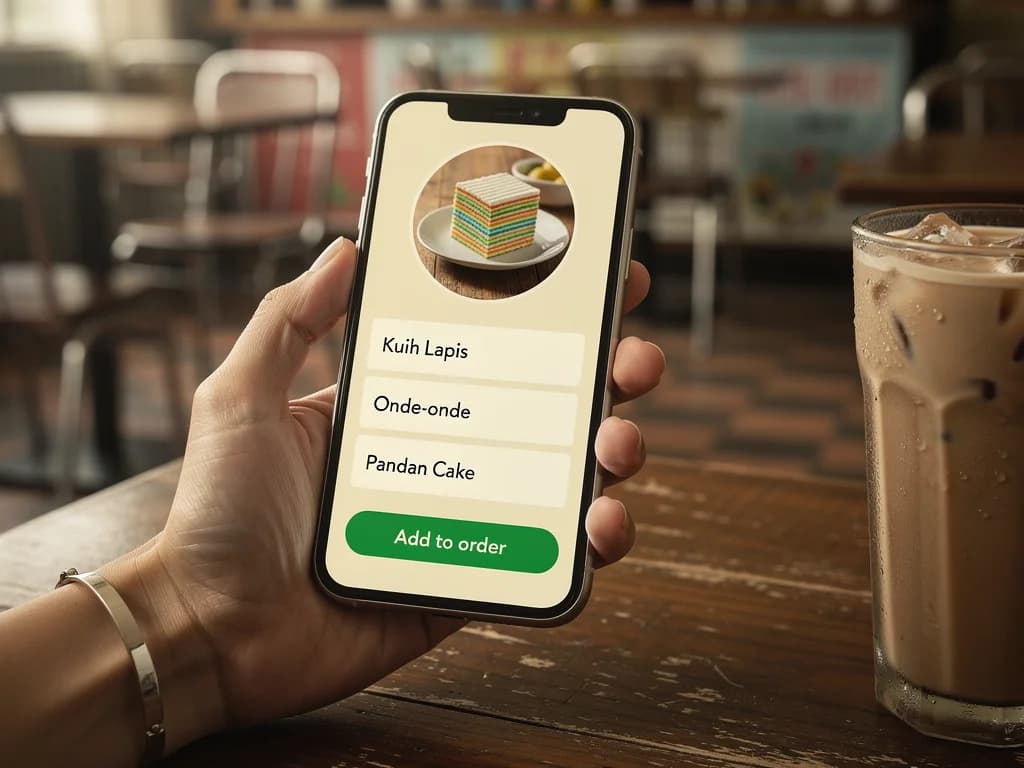
The Direct Order Page
A link customers can order from, pay through your QR, and come back to with their details already filled in on the same phone.
Direct order page
Your photo, your story, your menu. Real personality, not a template, with a clear path to order.
Conversational order flow
Visual menu by default. Customers add items, set quantities, leave notes — and your link captures the order without you typing a single message.
Personal story block
Two or three lines about who you are. Customers feel they're buying from a person, not a faceless seller.
Direct merchant payment
Show your own DuitNow QR and review the customer receipt. Payment goes directly to you; Kedaiflow does not receive, hold, settle, or refund customer funds.
Delivery or pickup, their choice
When you offer both, customers choose on the order form and enter a delivery address. You see the preference with every order — no back-and-forth on WhatsApp.
Lead time you set
Need a few days to prepare? Set your minimum lead time and customers can only choose a pickup or delivery date that far ahead — for the whole shop, or per product for items that take longer.
Directory listing, opt-in
Your shop stays out of the public directory until you enable listing in Settings. Free. Direct merchant-link orders stay at 0% commission; the direct link works regardless of listing.
The Vibrate, The Swipe, The Voice
When work is happening, Kedaiflow disappears. When you need it, one gesture is enough.
Vibrate-only notifications
Soft buzz when an order arrives. No jarring sound by default. Kedaiflow respects the kitchen, the hands, the flow.
Swipe forward
Swipe right to advance an order: received → cooking → ready → out → done. One gesture per step. That's it.
The Voice Ask
Tap mic and speak the order out loud. "Add ayam crispy 27 ringgit, kek lapis dua, hantar esok." Kedaiflow turns your words into a clean order — no typing.
Quiet hours by default
22:00–06:00 silent automatically. Family time stays family time.
The Companion
A presence that knows when to help, and when to stay quiet.
Reply drafts, never autoreply
When a customer asks about hours, prices, or a custom request, Kedaiflow drafts a reply ready for you to send. You always send — your voice, your judgment.
Status messages on tap
"Your order's ready." "Out for delivery." "Thank you." One tap fills the WhatsApp draft — you press send when it feels right.
Customer-confirmed delivery
When an order goes out, send a one-tap confirmation link via WhatsApp. The customer taps when they receive — no more chasing "is it there yet?" Kedaiflow doesn't track the courier; only the customer's confirmation matters.
Stock management with history
Update all quantities after a production run from one page. Every change is logged — which order consumed stock, when you restocked, and by how much. Exportable as CSV for your own records.

The Morning Brief
Each morning, Kedaiflow has something kind to say. Not charts — a few human words.
Morning brief, told kindly
A gentle heads-up to start the day — today's orders to prepare and a soft note if ingredient costs are creeping up. On quiet days: "Today looks lighter. That's okay. Rest up."
Monthly story
"This month — 12 first-time customers, all loved it. Top item: kek lapis, ordered 84×." Numbers told as a narrative.
Customer recognition
"Pak Andi's back! 3rd time this month. Want me to tag him 'regular'?"
Seasonal awareness
Two weeks before Ramadan: "Want help prepping your takjil menu?" Kedaiflow knows the rhythm of Malaysian commerce.
Money in, money out
Your summary isn't only sales. Log what you spend — stock, packaging, rent — and see what's actually left: money in, money out, net. No accounting jargon.
The Day's Run
One list for the day — what to make, what to pack, what to hand over — and a record of what changed after it was set.
One page for the day
Production totals by product, packing per order, balances, and handoff — for the day you pick, on one page. Print it for the kitchen.
Order cutoff, if you want one
Set the time a day's orders close. After the cutoff the day's list is sealed, so everyone works from the same version. No cutoff set, nothing changes.
Late changes, marked
An order edited, added or cancelled after sealing shows up on the list as a change — Kek 20 → 27 — instead of quietly rewriting it.
Staff sign-in by role
Invite your kitchen, packer or rider by email. Each signs in and sees only their part of the day — no balances, no payment records. Included on every plan.
Read before work
When a sealed line changes, the person working it confirms they have read the change before marking it made or packed. You see who has read what.
Close the day
Close a day when it is done. What was unfinished — unpaid, unpacked, not handed over — is listed with the closing, never erased.
Where each order came from
Every order you type in says where it came from — WhatsApp, Instagram, walk-in — so a day's list shows its sources.
Reliability
Quiet things that just work. So you trust the tool, then forget it.
Works offline
Lost signal? Keep taking orders; they sync when you're back online. If a day's cutoff passed in the meantime, the order waits on your phone until you add it late, try again, or remove it.
Stock auto-decrement
When you sell out, the menu auto-disables that item. No manual updates required.
Manual delivery updates
Mark delivery orders as on the way, add an optional courier and tracking number, and the customer's receipt shows the update. When a known courier has a public tracking portal, Kedaiflow links to it.
Auto invoice numbering
Sequential, never duplicated, ready when you need it.
Auto-draft invoices (Pro)
Switch on auto-invoice and accepting an order saves a ready draft to Invoices — buyer, items, and SST already filled in. You choose when to send it. Kedaiflow drafts, you send.
Quotations (sebut harga)
Send a price quote first, then turn it into an invoice in one tap once the customer says yes — no re-typing the items.
One more thing
Your invoices carry an SST line at 0% or 6% when you need one, and LHDN MyInvois submission is one tap when it’s enabled for your business (Pro). Kedaiflow does not prepare returns and does not watch the registration threshold for you. It stays out of your way until you need it.
Direct orders. One photo away.
Your first 50 orders are free. No credit card. No commission.